

Text
A versatile text component with predefined typography appearances. Use the appearance prop to apply consistent sets of typography related CSS.
Loading...
Loading...
Overview
Resources
Install
yarn add @camp/textProps
| Prop | Type | Default | Description |
|---|---|---|---|
appearance | "heading-small" | "heading-medium" | "heading-large" | "heading-xlarge" | "heading-xxlarge" | "heading-xxxlarge" | "body-xsmall" | "body-small" | "body-medium" | "monospace-xsmall" | "monospace-small" | "monospace-medium" | "monospace-large" | "eyebrow-small" | "eyebrow-medium" | "label-small" | — | The various text variants available from camp design system. Each appearance applies specific font-size, font-weight, line-height, and font-family. Based on exact Figma specifications: @example // Heading variants (semibold weight, IBM Plex Sans for small-large, Owners for xlarge+): appearance="heading-small" // 16px, semibold (600), 24px line-height, IBM Plex Sans appearance="heading-medium" // 20px, semibold (600), 28px line-height, IBM Plex Sans appearance="heading-large" // 24px, medium (500), 36px line-height, Owners appearance="heading-xlarge" // 32px, medium (500), 40px line-height, Owners appearance="heading-xxlarge" // 44px, medium (500), 52px line-height, Owners appearance="heading-xxxlarge" // 60px, medium (500), 76px line-height, Owners // Body variants (regular weight, IBM Plex Sans): appearance="body-xsmall" // 12px, regular (400), 16px line-height, IBM Plex Sans appearance="body-small" // 14px, regular (400), 20px line-height, IBM Plex Sans // Monospace variants (regular weight, IBM Plex Mono): appearance="monospace-xsmall" // 12px, regular (400), 16px line-height, IBM Plex Mono appearance="monospace-small" // 14px, regular (400), 20px line-height, IBM Plex Mono appearance="monospace-medium" // 16px, regular (400), 24px line-height, IBM Plex Mono appearance="monospace-large" // 24px, regular (400), 36px line-height, IBM Plex Mono // Eyebrow variants (bold weight, IBM Plex Sans, uppercase, letter-spacing): appearance="eyebrow-small" // 12px, bold (700), 16px line-height, IBM Plex Sans, uppercase appearance="eyebrow-medium" // 14px, bold (700), 20px line-height, IBM Plex Sans, uppercase |
as | ElementType<any, keyof IntrinsicElements> | span | The HTML element to render the text as. When set to a specific element type, the component will accept that element's props. @example // As an anchor tag - accepts href, target, rel, etc. <Text as="a" href="/link" target="_blank">Link</Text> // As a label - accepts htmlFor <Text as="label" htmlFor="input-id">Label</Text> // As a heading - accepts standard heading attributes <Text as="h1" id="heading">Title</Text> |
color | "disabled" | "default" | "supportive" | "success" | "on-emphasis" | "primary-on-emphasis" | "destructive-on-emphasis" | "muted" | "primary.default" | "secondary.default" | "secondary.default-hover" | "secondary.default-active" | "destructive.default" | — | The color of the text. |
themed | boolean | — | Whether the text should adapt to light/dark theme modes. When false, forces light theme regardless of context. |
style † | unknown | — | |
key † | unknown | — | |
dangerouslySetInnerHTML † | unknown | — | |
id † | unknown | — | |
className | string | — | Optionally specify a className |
htmlFor | string | — | The htmlFor attribute for label association. Use this when rendering the component as a label element. |
role † | unknown | — | |
aria-hidden † | unknown | — | Indicates whether the element is exposed to an accessibility API. @see aria-disabled. |
aria-label † | unknown | — | Defines a string value that labels the current element. @see aria-labelledby. |
onClick † | unknown | — | |
ref † | unknown | — | Allows getting a ref to the component instance. Once the component unmounts, React will set `ref.current` to `null` (or call the ref with `null` if you passed a callback ref). @see {@link https://react.dev/learn/referencing-values-with-refs#refs-and-the-dom React Docs} |
ai | boolean | — | @deprecated The AI sparkle icon was removed from heading text (DESS-3047). This prop no longer has any effect and will be removed in a future major version. |
disabled | boolean | — | Adds disabled styling to the text |
Generated from @camp/text@9.7.2 source, ordered by production usage. * required. † standard HTML attribute — all native attributes are supported; only those with production usage are listed.
Advantages of the new Text component
-
🎨 Appearance prop: The
Textcomponent now uses theappearanceprop to apply typography styles. This replaces the oldtypeprop. -
🔆 Themed prop: The
Textcomponent now supports thethemedprop to enable light and dark theming.
Upgrading from AiText or older versions of Text
The Text component has recently been consolidated, which means the ai-text component is deprecated as is the old Text API. See below for details and how to upgrade.
Upgrading from AiText to Text
// Previous implementation
import { AiText } from '@camp/ai-text';

<AiText appearance="heading-large" as="h1" color="default">Page title</AiText>
<AiText appearance="body-small" color="default">Description text</AiText>

// New implementation
import { Text } from '@camp/text';

<Text appearance="heading-large" as="h1" color="default">Page title</Text>
<Text appearance="body-small" color="default">Description text</Text>
Upgrading from Old Text API to New Text API
// Previous implementation
import { Text } from '@camp/text';

<Text type="body">I am some text</Text>
<Text type="heading" as="h3">I am some text</Text>
<Text type="eyebrow">I am some text</Text>

// New implementation
import { Text } from '@camp/text';

<Text appearance="body-small" color="default">I am some text</Text>
<Text appearance="heading-small" as="h3" color="default">I am some text</Text>
<Text appearance="eyebrow-small" color="default">I am some text</Text>
Migration steps
- Update the import path to use the new
Textcomponent from@camp/text - Update the
appearanceprop to use the newappearanceprop - Use the new
colorprop to enable theming - Update the
asprop to use the newasprop
Variations
Pro tip: To view what sets of styles are being applied for each
appearancevalue, hover over theTextcomponent to view the full guide.
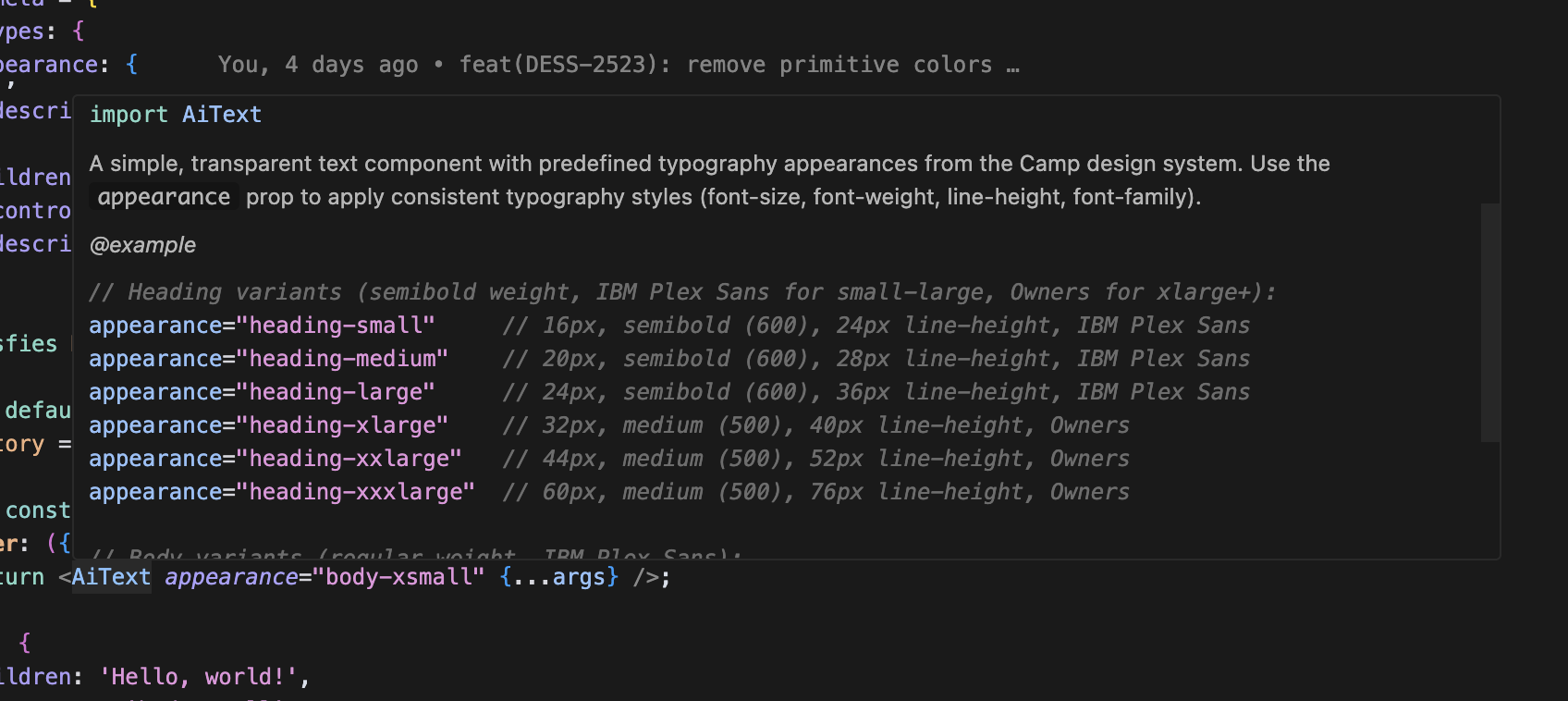
Heading variants
Heading variants use semibold weight (600) with IBM Plex Sans for small through large sizes, and medium weight (500) with Owners font for large and above.
import { Text } from '@camp/text';

<Text appearance="heading-xxlarge" color="default">
  Heading
</Text>;
Body variants
Body variants use regular weight (400) with IBM Plex Sans font family.
import { Text } from '@camp/text';

<Text appearance="body-xsmall" color="default">
  Body
</Text>;
Monospace variants
Monospace variants use regular weight (400) with IBM Plex Mono font family.
import { Text } from '@camp/text';

<Text appearance="monospace-medium" color="default">
  Monospace
</Text>;
Eyebrow variants
Eyebrow variants use bold weight (700) with uppercase transformation and increased letter spacing.
import { Text } from '@camp/text';

<Text appearance="eyebrow-small" color="default">Small eyebrow</Text>
<Text appearance="eyebrow-medium" color="default">Medium eyebrow</Text>
Label variants
The label variant is specifically used for form labels. It uses medium weight (500) with IBM Plex Sans font family.
import { Text } from '@camp/text';

<Text appearance="label-small" color="default">
  Form label text
</Text>;
Color variations
The component supports various color options through the design system's color tokens.
import { Text } from '@camp/text';

// Direct color values
<Text color="default">Default text color</Text>
<Text color="supportive">Supportive text color</Text>
<Text color="success">Success text color</Text>
<Text color="destructive">Destructive text color</Text>

// Nested color values using dot notation
<Text color="primary.default">Primary default</Text>
<Text color="secondary.default">Secondary default</Text>
<Text color="secondary.default-hover">Secondary hover</Text>
HTML element variants
Use the as prop to render the text as different HTML elements while maintaining the same visual appearance.
import { Text } from '@camp/text';

<Text appearance="heading-large" as="h1" color="default">This is an H1 heading</Text>
<Text appearance="heading-medium" as="h2" color="default">This is an H2 heading</Text>
<Text appearance="body-small" as="p" color="default">This is a paragraph element with body text styling</Text>
<Text appearance="body-small" color="default">This is inline span text (default element)</Text>
<Text appearance="label-small" as="label" color="default">Form Label Text</Text>
All appearances
Usage
Best practices
- Use heading variants to establish clear typographic hierarchy in your interfaces
- Choose appropriate heading sizes based on content importance and page structure
- Use body variants for readable paragraph text and descriptions
- Apply eyebrow variants for labels, categories, and supplementary information
- Leverage the
asprop to ensure semantic HTML while maintaining visual consistency - Use color variants to convey meaning and align with your content's purpose
Content guidelines
✅ DO
- Use sentence case for most text content
- Keep heading text concise and descriptive
- Choose colors that provide sufficient contrast
- Use semantic HTML elements with the
asprop
🚫 DON’T
- Don't use ALL CAPS except for eyebrow variants (which handle this automatically)
- Don't mix multiple heading sizes without purpose
- Don't use decorative colors that compromise readability
- Don't ignore semantic markup when using different appearances
Accessibility
Screen reader support
- Use semantic HTML elements through the
asprop to provide proper structure for screen readers - Heading variants should use appropriate heading tags (h1, h2, etc.) to create logical document structure
- Ensure text content is meaningful and provides sufficient context