Tag
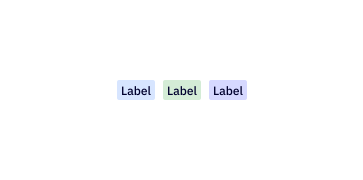
Tags display essential contact data quickly and easily. Users can segment and target contacts based on the tags applied to them.
Loading...
Overview
Resources
Install
yarn add @camp/tagProps
| Prop | Type | Default | Description |
|---|---|---|---|
text | string | — | Used to display the content of a tag. |
onDismiss | (text: ReactNode) => any | — | When provided, this property will show a button to remove the tag. Once the button is pressed, the dismiss handler function will be called with the tag's text as the first argument. |
Generated from @camp/tag@2.4.0 source, ordered by production usage. * required.
Upgrading to Next Gen
🔄 Package and import path: Tag is now published from the Camp Design System as @camp/tag instead of @activecampaign/camp-components-tag. The API is unchanged.
Previous Implementation
import Tag from '@activecampaign/camp-components-tag';

<Tag text="Example Tag" />
<Tag text="Dismissible Tag" onDismiss={(text) => console.log(text)} />
New Implementation
import Tag from '@camp/tag';

<Tag text="Example Tag" />
<Tag text="Dismissible Tag" onDismiss={(text) => console.log(text)} />
Migration Steps
- Update the import path: Replace
@activecampaign/camp-components-tagwithTagfrom@camp/tag. - No API changes: All existing props (
text,onDismiss,children) work the same way.
Variations
Simple Tag
A basic tag that displays a text label. Use when you need a static, non-interactive label.
import Tag from '@camp/tag';

<Tag text="Simple Tag" />;
Dismissible Tag
A tag with a dismiss button. When onDismiss is provided, a close button appears. The callback receives the tag text as its argument.
import Tag from '@camp/tag';

<Tag text="Dismissible Tag" onDismiss={(text) => console.log(text)} />;
With Children
Tag also accepts children instead of the text prop, allowing custom content inside the tag.
import Tag from '@camp/tag';

<Tag>Custom children content</Tag>;
All Variants
An overview of all tag variations side by side.
import Tag from '@camp/tag';

<Tag text="Simple Tag" />
<Tag text="Dismissible Tag" onDismiss={(text) => console.log(text)} />
<Tag>Children Tag</Tag>
<Tag onDismiss={(text) => console.log(text)}>Dismissible Children</Tag>
Usage
Best Practices
- Use tags to label, categorize, or organize contacts and items
- Keep tag text concise and descriptive
- Use
onDismisswhen users should be able to remove a tag - Use the
textprop for simple string labels; usechildrenonly when you need custom content inside the tag - Tags have a maximum width and will truncate long text with an ellipsis
Content Guidelines
✅ DO
- Keep tag labels short and clear (1–3 words)
- Use sentence case for tag labels
- Use tags to categorize or segment contacts
🚫 DON’T
- Don't use tags for actions — use buttons instead
- Don't use overly long text that will be truncated
- Don't use tags as status indicators — use chips or banners instead
Accessibility
Keyboard Support
- When a tag has an
onDismisshandler, the dismiss button can be focused via Tab and activated with Enter or Space - The dismiss button includes an
aria-labelof "close" on the close icon for screen readers
Screen Reader Support
- Tags without
onDismissrender as a<span>, which is presentational and announced as static text - Dismissible tags include a
<button>element so assistive technology recognizes the interactive dismiss action